
What GeoDjango is
GeoDjango is the django.contrib.gis module: points, lines and areas in models. Distance and "inside an area" queries run in the PostGIS database. It suits cafes, branches, couriers and maps.
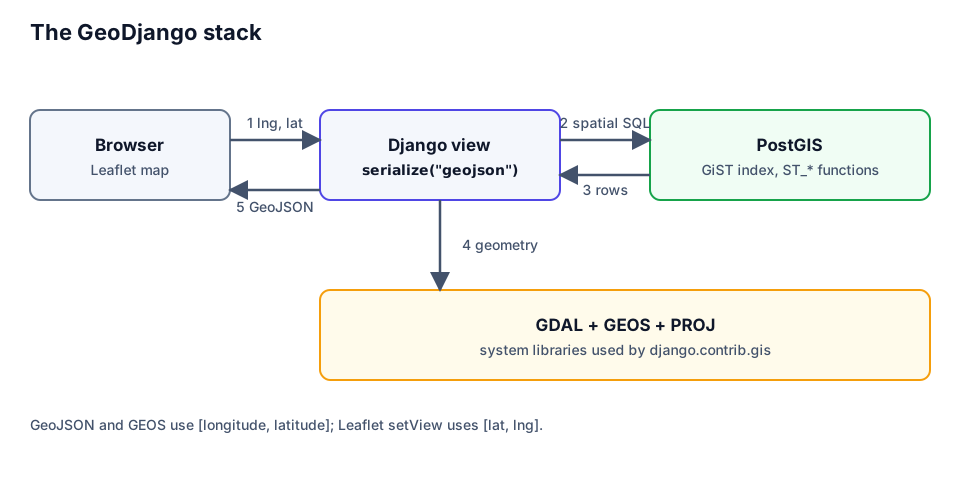
| Component | Role |
|---|---|
| PostGIS | spatial types, indexes, ST_* functions |
| GEOS | Point, Polygon objects in Python |
| GDAL | file formats, GDAL_LIBRARY_PATH |
| PROJ | coordinate system transforms |
SRID 4326 (WGS 84) is the coordinate system of maps and GPS. The rule is longitude (x) first, latitude (y) second.
Setup: PostGIS and GDAL
For the database the easiest route is the postgis/postgis image:
services:
  db:
    image: postgis/postgis:16-3.4
    environment:
      POSTGRES_DB: geo
      POSTGRES_USER: geo
      POSTGRES_PASSWORD: change-me
    ports:
      - "5432:5432"
Django needs GDAL, GEOS and PROJ on the system. No Python package is required.
# Ubuntu / Debian / Dockerfile
sudo apt-get install -y gdal-bin libgdal-dev

# macOS
brew install gdal
On Windows install GDAL through OSGeo4W and point GDAL_LIBRARY_PATH at the DLL. The DLL name depends on the version (for example gdal310.dll).
# settings.py
INSTALLED_APPS = [
    # ...
    "django.contrib.gis",
    "places",
]

DATABASES = {
    "default": {
        "ENGINE": "django.contrib.gis.db.backends.postgis",
        "NAME": "geo",
        "USER": "geo",
        # PASSWORD and HOST come from environment variables
    }
}

# Only if Django cannot find the libraries itself (typical on Windows):
# GDAL_LIBRARY_PATH = r"C:\OSGeo4W\bin\gdal310.dll"
⚠️ The error
Could not find the GDAL librarymeans the library was not found: install the system package or set the path.
